Yesterday my friend gave me his Ipod touch 2G which he thought might be completely frozen so I took a look at it and I found the solution is farly easy but took some time to complete. Also today I was searching the web and I found out someone else was having the same problem so I know it wasn't just a freak accident. Here's the steps to fix your problem.
1. Turn off your Ipod Touch.
2. unplug it from your computer if it was plugged in.
3. Put it into DFU mode. (don't worry if it doesn't get past the boot logo it can still go into DFU mode.) instructions below if you don't know how to do it.
4. if Itunes opens up saying it recognises an ipod in restore mode youve done it right so far.
5. Download the origional Firmware from Itunes or from Here. (this will take about 20 mins.)
6. Restore your Ipod to the origional Firmware.
If all that works your ipod will be fixed and if you want to you can re-jailbreak it.
How to put Ipods into DFU mode.
1. Unplug Ipod touch from computer and turn off.
2. Hold Power and Home buttons while you plug ipod in. (hold for ten seconds.)
3. let go of power and continue holding home until itunes recognises it as ipod in restore mode.
Showing posts with label How To. Show all posts
Showing posts with label How To. Show all posts

April 25, 2009
How to add all Cydia sources
Here's a quick tutorial on how to add all Trusted Cydia sources on your jailbroken Ipod Touch 2G/Iphone.
**As a little caution this will slow the loading time of Cydia but it's worth it**
**As a little caution this will slow the loading time of Cydia but it's worth it**
Automatically
Go down to manually if automatic doesn't work
First, go to the "Sections" tab and Scroll down to "Repositories"
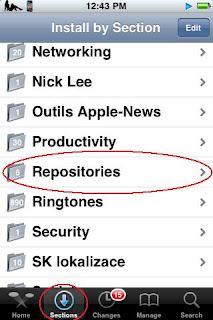
Next, Find the PwnCenter repository
Then install and confirm like you normally would.
For the next step select "Search" then search for "All Sources" Finally install and confirm "All Sources" and enjoy all your new Cydia sources!
Manually
First try Automatically this takes more time to do.
Open Cydia, Go to the "Manage" Tab and select "Sources" Then Select at the top "Edit" and "Add"
Add this source in the "Enter Cydia/APT URL"
http://apt.pwncenter.com/ Then select "Search" then search for "All Sources"
Finally install and confirm "All Sources" and enjoy all your new Cydia sources!
Subscribe to:
Posts (Atom)
