Showing posts with label Cydia. Show all posts

June 27, 2013

Free in App purchases (non server based games only)

How to Get Free in App Purchases

Hey guys Carter here, today I'll go over how to get free in app purchases on your jailbroken Apple device. (video below)
What You'll Need:
Jailbroken device
Cydia
Sinful Iphone Repo (http://sinfuliphonerepo.com)
iAPFree
Instructions:
1. Go to Cydia in your device and add the Sinful iPhone Repo if you don't already have it.
Cydia - Manage - Sources - Edit
2. Search for iAPFree and install.
 3. Go to the application icon and when you open it for the first time it will prompt you to "Download the core Plugin." Make sure you install that plug in or it wont work.

4. I'd recommend logging out of iTunes for the first purchase to make sure the hack worked properly. If you get prompted to purchase or login cancel otherwise you'll end up getting charged for the purchase. It should just take you right through after you hit purchase without any further prompts.

There you go! You now get free in app purchases.

A few apps that are non server based.
Where's the Water
SI Swimsuit 2012/2013


If you have any questions or comments feel free to let me know.


Also check out my YouTube!
Crater's Jailbreak Blog

May 31, 2009

Broken home or power buttons? Here's the solution!

Recently I Came across a program called mQuickDo by mcleaner it's basically a virtual home and power button with alot of options other than that. Some of its features are but arn't limited to, option to "Respring" your device, sleep mode (usually done by taping the power button), lock mode, Home, quick access dock, and I love this one it even gives you the option to completely close out an application and ill explain what I mean by that.
When you use the applications Mail and Safari after you close them using the home button those two apps don't completely close out they run in the background and use up precious virtual memory. mQuickDo gives you the option to open up it's menu (slide your finger across the top or bottom depending where you have the quick access bar.) after opening up the menu if you drag an open app the the left side of the screen it will completely close out the app saving you virtual memory to play your games. If you've used one of the apps like FreeMemory you'll know exactly what im talking about since it's basically the same thing.
Also by opening up the mQuickDo menu you can get a quick access dock what this is is you can open up the mQuickDo menu even when other applications are running. When the menu is open at the bottom there is (up to five icons) on the dock you can open. By opening a new app it will automatically close out the app your in and open up the new one. Another cool feature of the quick access dock is it puts a dock on your lock screen so if you open your lockscreen there will be the dock if you use the dock it will unlock your device and start the app (this will turn off your passcode if you have one).
This app is avalible in Cydia after you add "All Sources" unfortunatly this is not a free app it costs 8 dollars but they do give you a free 3 day trial. this is a great app if your buttons arn't working correctly and your out of warranty. Even if your buttons arn't broken I still Recommend it just because it will extend the life of your device. Eight bucks is a hell of a lot less then 2 -3 hundred
Here's a direct link to the mQuickDo part of mcleaners website. http://mcleaner.com/iphone_w/mquickdo.shtml
While your at it they make good products so check those out also.

April 25, 2009

How to add all Cydia sources

Here's a quick tutorial on how to add all Trusted Cydia sources on your jailbroken Ipod Touch 2G/Iphone.
**As a little caution this will slow the loading time of Cydia but it's worth it**
Automatically
Go down to manually if automatic doesn't work
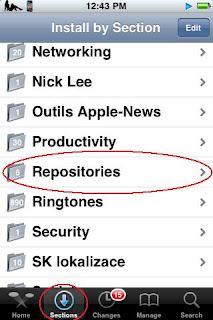
First, go to the "Sections" tab and Scroll down to "Repositories"

Next, Find the PwnCenter repository

Then install and confirm like you normally would.
For the next step select "Search" then search for "All Sources"Finally install and confirm "All Sources" and enjoy all your new Cydia sources!
Manually

First try Automatically this takes more time to do.

Open Cydia, Go to the "Manage" Tab and select "Sources"Then Select at the top "Edit" and "Add"

Add this source in the "Enter Cydia/APT URL"

http://apt.pwncenter.com/Then select "Search" then search for "All Sources"

Finally install and confirm "All Sources" and enjoy all your new Cydia sources!