Showing posts with label Apple. Show all posts

June 30, 2013

Free in app purchases (Server Based games)

How To Crack Server Based In App Purchases

I found this hack last night and I instantly decided today that I had to share it with you guys games that need a server check like The Sims: Free Play are now able to be hacked to get free in app purchases. This hack tricks the application into thinking it talks to the server and it even goes as far as generating a fake receipt for the application to read and allow you to get whatever you want from the app. Here's a text walk through for a video walk through look at the bottom or check out my YouTube page.

What You'll Need:
 Cydia
system.in-appstore.com/repo/
LocalIAPStore
Server Based app (The Sims: Free Play)


Instructions:
First, you'll go into Cydia and install the appstore repo.
 system.in-appstore.com/repo/

Go into your new repo and install the LocalIAPStore hack.

In your settings application scroll down to the LocalIAPStore category and make sure it's enabled and you turn on Generate Custom Receipt.

*Make sure you log out of your iTunes account before doing an in store purchase*

Now go into your application and  buy the addons you want.

*IF you're prompted to log in do not continue*


 Enjoy your new hack!

Check out my YouTube page! Here

June 27, 2013

Free in App purchases (non server based games only)

How to Get Free in App Purchases

Hey guys Carter here, today I'll go over how to get free in app purchases on your jailbroken Apple device. (video below)
What You'll Need:
Jailbroken device
Cydia
Sinful Iphone Repo (http://sinfuliphonerepo.com)
iAPFree
Instructions:
1. Go to Cydia in your device and add the Sinful iPhone Repo if you don't already have it.
Cydia - Manage - Sources - Edit
2. Search for iAPFree and install.
 3. Go to the application icon and when you open it for the first time it will prompt you to "Download the core Plugin." Make sure you install that plug in or it wont work.

4. I'd recommend logging out of iTunes for the first purchase to make sure the hack worked properly. If you get prompted to purchase or login cancel otherwise you'll end up getting charged for the purchase. It should just take you right through after you hit purchase without any further prompts.

There you go! You now get free in app purchases.

A few apps that are non server based.
Where's the Water
SI Swimsuit 2012/2013


If you have any questions or comments feel free to let me know.


Also check out my YouTube!
Crater's Jailbreak Blog

May 28, 2013

Apple confirms that iOS 7 will be at the WWDC conference

I'm sure you all have heard countless rumors about apples iOS 7 that will be unveiled next month during the WWDC Conference. The conference will start with Apple's confirmation that they will lead the pack unveiling it's new design first. Jonathan Ive has completely changed the look of Scott Forstall's software most of us have become more than comfortable with.

So far what I've come to understand about the new design are more like the Windows phone than I would have ever thought Apple would come to a Windows product. The changes that are said to take place are features like flat icons that have individual colors, lose their shine, shadow and have flat white textures. In addition to the change of icons there are changes such as the linen and leather backgrounds of the calendar and Notification Center to go with once again a more flat look. Some wishes have been answered from jailbreakers like what sounds like an easy toggle for bluetooth, Wifi and airplane mode. We may even see a weather Widget show up in the new iOS as well. Even though there will be all these massive changes to the iOS looks the overall functionality of the device sounds like it will be the same all the changes will be for the most part cosmetic but that doesn't mean more wont change.

The general consensus is that the new iOS will release alongside the new iPhone this coming Fall with no official release date announced. Things could be getting more interesting when the look of what seems to be most of the Apple line up may be getting a revamp for this new iOS release. 


The thing we can all look forward to is with a brand new iOS releasing along with new hardware on the devices we can count on lots of bugs and an easy jailbreak for Apples new setup.


Are you ready for the new iOS? What do you think about the revamp?

May 20, 2013

Troubleshooting walk through 6.0.1 - 6.1.2.

Welcome to the troubleshooting part of my blog I'll keep this post updated with issues that occur in IOS 6.0.1 - 6.1.2 to help you guys track down that tweak or app that causes your device to respring, crash or freeze hopefully help you guys cut down countless hours of troubleshooting.. I'll mainly post the tweaks and apps that usually cause problems.

Auxo - A memory leak occurs in this app causing your device to crash when the home button is double tapped.

Protube 2 - Uses the YouTube application as a primary but if you update your YouTube app you can find yourself having the app crash a lot.

Springtomize - This app can cause a few Issues so I'll walk you through them
Lockscreen Notification center - This tweak can cause a frozen lockscreen when the notification center is in  use.
Hidden slider tweak -Has the potential of keeping you from unlocking your device, If this happens restart your device and hold the volume up button.

Weather app - In iOS 6x a corrupted file makes the stock Weather app crash if you download iOS 6.x weather app fix it will replace only that one file allowing you to use the app again.

Winterboard - If you use a full theme on this app I'd recommend removing some tweaks you're not so fond of because this tweak will suck tons of memory making your device very very slow hope you brought a book!


Let me know what I missed I'll update with new info as I come across it!


Auxo and the double tap home crash

Auxo has a bad issue with using up extra memory, here's a way to fix that temporarily follow this video while I explain how and go into a good app called iCleaner.

May 17, 2013

Adding music to your music library?

This is a simple task when you have all the music on your computer in iTunes and you want to add it to your library but what if you have a jailbroken device and another app to download songs like Music box or Pandora Downloader, adding music from that library to your Music app is Impossible, right? Wrong...

As you can see I have the song 100 Years on Pandora Downloader I'll show you how to put that in your regular library so you don't have to keep changing libraries.

First, you'll need a client to download songs my two favorite are Pandora Downloader because it gives me unlimited skips, no ads, and the ability to download off Pandora. My second favorite is Music Box it allows me to find specific songs that I haven't been able to find anywhere else.

Second, you'll need the app Bridge if you have the Protube hack on your iPhone you'll probably already have this if not download both of those apps now off Cydia now.

Ok so you have Bridge and your client app now what?

Open Bridge and at the bottom it says "Files" go there you'll now be in your iPhone directory files find the media that you want to add to your Music library if you have used Pandora Downloader the directory you want to find is: /private/var/mobile/Media/Pandora
if you're using Music Box just go: /private/var/mobile/Library
Select the song which for me appears at the top of the list, it will then make you input some information about the song and if you want to import it as a song, ringtone or podcast.

Finally just hit the Import button and you'll get a conformation popup "Finished importing The file was successfully imported!"

Congratulations! Now you don't have to switch between music libraries when you want to hear your music. This method works for videos as well so go nuts! 

Oh Yeah and support your local artists if you like their music!

June 11, 2009

Cracked Apps Getting Deleted During iTunes Sync?

Until now everytime I would try to sync my Cracked .IPA's to iTunes they would just be removed altho I don't know the exact cause of why it's doing it I have figured out some ways to fix it.

1. Go into Installous and under settings switch the "iTunes Sync" switch to off. This will make it so the cracked .IPA's will not be removed from iTunes but they also wont get added to your iTunes library in the case your apps get removed from your jailbroken device you will need to redownload them all. So this is just masking the problem.

2. This will actually fix the problem to a point. If you want to be able to sync your apps to iTunes so you can remove them and readd them later you will need to get on your computer and go to the appulo website: www.appulo.us this is the desktop version of your Installous app. Search the app you want to add to your iTunes library and download it to the file:
C:\Users\Your Username\Music\iTunes\Mobile Applications.
If your Mobile Applications file isn't there open up your iTunes and under the Applications right click any app and select if on vista "Show in Windows Explorer" this might be different on an XP computer. After adding the files to that folder go into iTunes and add the files to the library by going File -> Add Folder to Library then select the Mobile Applications folder. As soon as those files are added to your library you can sync the apps to your device.

As soon as I find out how to sync it from Installous to iTunes I'll post it.

May 23, 2009

Ipod Completely and Helplessly Frozen? Not Anymore!

Yesterday my friend gave me his Ipod touch 2G which he thought might be completely frozen so I took a look at it and I found the solution is farly easy but took some time to complete. Also today I was searching the web and I found out someone else was having the same problem so I know it wasn't just a freak accident. Here's the steps to fix your problem.

1. Turn off your Ipod Touch.
2. unplug it from your computer if it was plugged in.
3. Put it into DFU mode. (don't worry if it doesn't get past the boot logo it can still go into DFU mode.) instructions below if you don't know how to do it.
4. if Itunes opens up saying it recognises an ipod in restore mode youve done it right so far.
5. Download the origional Firmware from Itunes or from Here. (this will take about 20 mins.)
6. Restore your Ipod to the origional Firmware.
If all that works your ipod will be fixed and if you want to you can re-jailbreak it.

How to put Ipods into DFU mode.
1. Unplug Ipod touch from computer and turn off.
2. Hold Power and Home buttons while you plug ipod in. (hold for ten seconds.)
3. let go of power and continue holding home until itunes recognises it as ipod in restore mode.

April 30, 2009

New Quick Freedom Version 1.2.0

Unlike in the last version of Quick Freedom version 1.1.0 Jailbreak was the only option but they added two more options to the load screen. The new additions are Boot logo which allows you to change your boot screen and your DFU screen with out having to completely rejailbreak your Ipod/Iphone just create a new firmware like if you were jailbreaking put your Ipod into DFU mode and restore just like in the actual jailbreak process but here's the best part it doesn't delete your stored info on your Ipod! **Your Ipod has to be jailbroken to use this feature tho**
And they were also kind enough to add a trouble shooting feature so that you can get extra help if you need it. (but as you know my sites are better help)

Here's 2 links to the Newest version of Quick Freedom http://www.filefactory.com/file/age57b6/n/Setup_exe
http://www.megaupload.com/?d=UMVX9L5I

Ill post a new step by step video on how to use it easily and correctly until then either check it out or use my old video!
http://www.youtube.com/watch?v=ZiaQhMVBiWM

April 25, 2009

My Personally Recommended Ipod/Iphone apps.

For anyone who Isn't sure what they should download here's a list of third party and apple apps I've enjoyed.
Third Party Applications
Winterboard - helps customize your springboard with Backgrounds, Docks, App icons Batteries and much more.
MxTube - Allows you to download YouTube videos on your Ipod Touch/Iphone and playback without WiFi.
Bossprefs - Settings manager lets you Disable Apple Killswitch (Apple's way of keeping tabs on your Ipod /Iphone by giving them access to removing any app off your Ipod) and being able to hide app icons that you don't use to clean up your springboard.
mQuickDo - For this one if you have $7 lying around its more then worth it it creates a virtual home and power button on your Ipod/Iphone this is probably the first on my list to buy. It comes with a three day trial but after that you have to buy it. This is an excelent app for those of you whos home buttons don't work or just want to extend the life of your device. (Very cheap alternative to buying a new device.)
Backgrounder - Lets you run an app in the background While you use a different app.
Installous - Allows you to download (Almost) any app that's in the App Store for free straight to your device.
NES - Emulator that lets you play NES Roms (games) on your Ipod/Iphone.
snes4iphone - Lets you play Super NES Roms on your Ipod.
gpSPhone - Lets you play GameBoy Advance Roms on your Ipod.
App Store Applications
AIM - Send and receive messages to your friends. Also free unlimited texting to your friends.
TouchGrind - Play with a skateboard on your Ipod/Iphone! Do flips and grinds to raise your score and become the best.
Fast&Furious - Race around the streets and caves just like the movie!
JellyCar - (Free) drive and maneuver your car to the finish.
Real Racing - Definatly one of the best racing games around. Real Racing sets a new bar in iPod Touch driving games.
MGSTouch - Play as snake to kill your enemies in this first person shooter.
Shooter - Love the movie? Play as Bob Lee Swagger to kill the enemies with your sniper rifle.
FieldRunners - Stratically place attack towers so that you can last as long as possible.
iheartradio - (Free) Stream your favorite radio stations straight to your device!
Tweetie - Manage your Twitter account anywhere!P ost, delete and add new people easily.
Wallet - Save all your passwords, bank accounts, and personal info with any password you can remember EVEN supercalifragilistic!! (I wouldn't want to type that in everytime but you get my point...) saves it straight onto your device so your the only one that will ever be able to read whats in it.
FML - Having a bad day? Here's something to cheer you up read about other peoples days from the website Fmylife.com this will bring you happness even during your worst days. (caution!! highly adictive!!) Also a pretty good social tool show your friends and try not to laugh at other peoples misfortune.
These are just some of my personal favorites you may think differently. Think I missed one? Leave your favorites in your comments.

How to add all Cydia sources

Here's a quick tutorial on how to add all Trusted Cydia sources on your jailbroken Ipod Touch 2G/Iphone.
**As a little caution this will slow the loading time of Cydia but it's worth it**
Automatically
Go down to manually if automatic doesn't work
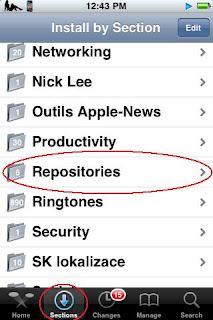
First, go to the "Sections" tab and Scroll down to "Repositories"

Next, Find the PwnCenter repository

Then install and confirm like you normally would.
For the next step select "Search" then search for "All Sources"Finally install and confirm "All Sources" and enjoy all your new Cydia sources!
Manually

First try Automatically this takes more time to do.

Open Cydia, Go to the "Manage" Tab and select "Sources"Then Select at the top "Edit" and "Add"

Add this source in the "Enter Cydia/APT URL"

http://apt.pwncenter.com/Then select "Search" then search for "All Sources"

Finally install and confirm "All Sources" and enjoy all your new Cydia sources!

April 24, 2009

Quick Freedom Jailbreak Error Help

Here's some error codes that I've been asked about so far hope this helps! If your perticuar error isn't on this web log message me and I'll get back to you with the answer.
Here's the programs the errors will fall under
1 LibUSB
2 Quick Freedom
3 Itunes
4 Ipod/Iphone
LibUSB errors
BLUE SCREEN OF DEATH! AHH - haha this ones not as bad as people portray it to be its a pretty easy one to fix without having to restore your computer. Here's what you need to do.
1. Restart your computer.
2. During startup press F8 and put your computer into "Safe Mode"
3. Uninstall LibUSB and then put your computer back into mormal mode.
USB Mouse stops working - This one's simple just unplug your mouse and plug it back in.
All USB ports stop working - Uninstall LibUSB and reinstall with compatibility set to windows XP Service pack 2 and run as administrator. if you can't uninstall it because your keyboard don't work follow the steps for the blue screen of death.
Quick Freedom errors
Ipod is not connected - Reinstall LibUSB and set it as administrator.
Error occurred - Are you sure you hit the "Download Firmware" button?
An error occured during process - Close Quickfreedom, Right click and select "Run As Administrator"
Itunes errors
There is not enough memory available (XP Problem) - SSL Cache Full (Follow instructions)
1 Click Start > Control Panel.
2 Double-click Internet Options.
3 On the Content tab, click Clear SSL State.
4 Click OK, when you get the SSL Cache Cleared Successfully message.
5 In the Internet Options window, click OK.
error 1604 - Restart your computer and restart the jailbreaking process.
error 13 - (Follow instructions)
1. Restart your computer.
2. Open itunes and close all other programs.
3. Put Ipod into DFU mode
Ipod touch/Iphone error
Partial Brick(if this works your Ipod wasn't bricked) - Put your Ipod touch/Iphone into DFU mode here's instructions:
1. Unplug your Ipod/Iphone from computer and turn it off.
2. Hold power button(button on top) and home button (square button) for ten seconds, at the same time and plug Ipod/Iphone into computer(the one you were using!!)
3. Let go of Power button and continue holding Home button for about 10 seconds or untill computer recognises Ipod/Iphone.
4. Re-sync Ipod/Iphone to original firmware.
Bricked - There's no such thing, this term was created for people who messed up their PSP's while trying to hack it. It is impossible to brick an Ipod Touch.
I'll add to this blog as i come across new problems if your problem is not here message me Here.
Or E-mail me at Megacratercmc@aol.com