June 30, 2013

Free in app purchases (Server Based games)

How To Crack Server Based In App Purchases

I found this hack last night and I instantly decided today that I had to share it with you guys games that need a server check like The Sims: Free Play are now able to be hacked to get free in app purchases. This hack tricks the application into thinking it talks to the server and it even goes as far as generating a fake receipt for the application to read and allow you to get whatever you want from the app. Here's a text walk through for a video walk through look at the bottom or check out my YouTube page.

What You'll Need:
 Cydia
system.in-appstore.com/repo/
LocalIAPStore
Server Based app (The Sims: Free Play)


Instructions:
First, you'll go into Cydia and install the appstore repo.
 system.in-appstore.com/repo/

Go into your new repo and install the LocalIAPStore hack.

In your settings application scroll down to the LocalIAPStore category and make sure it's enabled and you turn on Generate Custom Receipt.

*Make sure you log out of your iTunes account before doing an in store purchase*

Now go into your application and  buy the addons you want.

*IF you're prompted to log in do not continue*


 Enjoy your new hack!

Check out my YouTube page! Here

June 27, 2013

Free in App purchases (non server based games only)

How to Get Free in App Purchases

Hey guys Carter here, today I'll go over how to get free in app purchases on your jailbroken Apple device. (video below)
What You'll Need:
Jailbroken device
Cydia
Sinful Iphone Repo (http://sinfuliphonerepo.com)
iAPFree
Instructions:
1. Go to Cydia in your device and add the Sinful iPhone Repo if you don't already have it.
Cydia - Manage - Sources - Edit
2. Search for iAPFree and install.
 3. Go to the application icon and when you open it for the first time it will prompt you to "Download the core Plugin." Make sure you install that plug in or it wont work.

4. I'd recommend logging out of iTunes for the first purchase to make sure the hack worked properly. If you get prompted to purchase or login cancel otherwise you'll end up getting charged for the purchase. It should just take you right through after you hit purchase without any further prompts.

There you go! You now get free in app purchases.

A few apps that are non server based.
Where's the Water
SI Swimsuit 2012/2013


If you have any questions or comments feel free to let me know.


Also check out my YouTube!
Crater's Jailbreak Blog

June 26, 2013

Hack The Simpsons Tapped Out!


Alright so, you love the Simpsons Tapped Out but are getting tired of the lack of doughnuts. Well if your device is jailbroken have no fear there's a hack for free doughnuts and by following this video you'll learn not only how to do it but what you'll need for it. If you've done this hack before but haven't done this one watch the full video I go into what's different from the other hacks that used similar methods.


How to hack the simpsons tapped out and get unlimited donuts.

What you need:
iFile (Cydia)
Safari Download Manager (Cydia)
crack file (MediaFire)
The Simpsons Tapped out (Apple Store)


Also check out my YouTube for other jailbreak related information!

June 5, 2013

Springtomize reinventing the way you tweak your device.

Springtomize is simplicity in action if you're just getting into jailbreaking or if you have done it for a while and just don't know about this app it is a must have. You can do anything from text color editing to a cover flow design on your dock this is a great way to quickly tweak your device to your liking without having to track down tweak after tweak using Cydia. You can download Springtomize 2 through the BigBoss Repo (for $2.99) or off iHacksRepo (free).  I've created this walk through video to help you figure it all out and to learn some new features. If you have any questions shoot me a message or leave me a comment I'll answer your questions as soon as I get them!

May 28, 2013

Apple confirms that iOS 7 will be at the WWDC conference

I'm sure you all have heard countless rumors about apples iOS 7 that will be unveiled next month during the WWDC Conference. The conference will start with Apple's confirmation that they will lead the pack unveiling it's new design first. Jonathan Ive has completely changed the look of Scott Forstall's software most of us have become more than comfortable with.

So far what I've come to understand about the new design are more like the Windows phone than I would have ever thought Apple would come to a Windows product. The changes that are said to take place are features like flat icons that have individual colors, lose their shine, shadow and have flat white textures. In addition to the change of icons there are changes such as the linen and leather backgrounds of the calendar and Notification Center to go with once again a more flat look. Some wishes have been answered from jailbreakers like what sounds like an easy toggle for bluetooth, Wifi and airplane mode. We may even see a weather Widget show up in the new iOS as well. Even though there will be all these massive changes to the iOS looks the overall functionality of the device sounds like it will be the same all the changes will be for the most part cosmetic but that doesn't mean more wont change.

The general consensus is that the new iOS will release alongside the new iPhone this coming Fall with no official release date announced. Things could be getting more interesting when the look of what seems to be most of the Apple line up may be getting a revamp for this new iOS release. 


The thing we can all look forward to is with a brand new iOS releasing along with new hardware on the devices we can count on lots of bugs and an easy jailbreak for Apples new setup.


Are you ready for the new iOS? What do you think about the revamp?

May 21, 2013

Jailbreak your iDevice! IOS 6.0.1 - 6.1.2

 I've had my iPhone jailbroken using this method for a few months now and it is by far the easiest jailbreak method I've ever used. If you're familiar with my old videos I had to do two separate videos for the iPod touch 2G because there were multiple programs used and they were sketchy at best installing them LibUSB caused many problems to peoples computers when they didn't install it with administrative privileges.
Anyway here's the process to jailbreaking your iOS 6x device using the Evasi0n method.

First things first

Download Evasi0n software: http://www.evasionjailbreak.com/download-evasion-1.5.3-update-to-jailbreak-6.1.2-untethered/

SYSTEM REQUIREMENTS:

- MacOSX 10.5/10.6/10.7/10.8
- Windows (XP minimum)
- Linux x86/x86_64 (Kernel >= 2.6.24, libgtk+-2.0 >= 2.24.13)

SUPPORTED FIRMWARES:
- iOS 6.0, 6.0.1, 6.0.2, 6.1, 6.1.1, and 6.1.2.

SUPPORTED DEVICES:
  • iPhone 5
  • iPhone 4S
  • iPhone 4
  • iPhone 3Gs
  • iPad 4
  • iPad mini
  • iPad 3
  • iPad 2
  • iPod touch 5th Gen
  • iPod touch 4th Gen

INSTRUCTIONS:

1. Backup your device through apple before using evasi0n. If you need to fully reset you can restore data.

2. Disable the backup password as well as your lock screen password there have been issues if these are on during the jailbreak. After the jailbreak you can always add them again.

3. Launch evasi0n (pic below), plug in your device, and click "Jailbreak". This is by far the easiest part letting the software crack your device.
4. This may take awhile so leave your idevice alone grab a drink and let it do it's job don't touch your device if an apple message comes up.

5. This process is safe for your device but if it freezes go ahead and restart it hold down both the power and home buttons if necessary.


Seriously, it's that easy now enjoy your new jailbroken device

May 20, 2013

Troubleshooting walk through 6.0.1 - 6.1.2.

Welcome to the troubleshooting part of my blog I'll keep this post updated with issues that occur in IOS 6.0.1 - 6.1.2 to help you guys track down that tweak or app that causes your device to respring, crash or freeze hopefully help you guys cut down countless hours of troubleshooting.. I'll mainly post the tweaks and apps that usually cause problems.

Auxo - A memory leak occurs in this app causing your device to crash when the home button is double tapped.

Protube 2 - Uses the YouTube application as a primary but if you update your YouTube app you can find yourself having the app crash a lot.

Springtomize - This app can cause a few Issues so I'll walk you through them
Lockscreen Notification center - This tweak can cause a frozen lockscreen when the notification center is in  use.
Hidden slider tweak -Has the potential of keeping you from unlocking your device, If this happens restart your device and hold the volume up button.

Weather app - In iOS 6x a corrupted file makes the stock Weather app crash if you download iOS 6.x weather app fix it will replace only that one file allowing you to use the app again.

Winterboard - If you use a full theme on this app I'd recommend removing some tweaks you're not so fond of because this tweak will suck tons of memory making your device very very slow hope you brought a book!


Let me know what I missed I'll update with new info as I come across it!


Auxo and the double tap home crash

Auxo has a bad issue with using up extra memory, here's a way to fix that temporarily follow this video while I explain how and go into a good app called iCleaner.

May 18, 2013

Why Jailbreak Updated for IOS 6.0.1 - 6.1.2

Hey jailbreakers,

I thought I'd  update my old post on why you should jailbreak your device. Most of the information I would tell you is the same as before but there are some differences since my last post. 

What is Jailbreaking?
Jailbreaking is the act of accessing the root of a device that way you can put a third party product on the device allowing for a more open source for design, programs or use ability.

Here's some reasons why you should join the lot of us who jailbreak.

1. The whole jailbreak process takes less than ten minutes thanks to envasiOn unlike before when you had to install two programs, find the correct firmware, start the jailbreak process, and restart two or three times because something went wrong. Now all you have to do is download one program, put the device into DFU mode and the program does the rest.

2. Once again bricking your device and voiding the warranty are uncommon restoring the uncracked firmware fixes the warranty question and resetting DFU mode will allow you to restart the jailbreak.

3. Customization! Apple's idevices easily still have the market when it comes to smart devices so why do you want the outside and inside to look and function the same? Add some flair and personality.

After you jailbreak the world off possibilities is endless... Well you still can't make your phone turn into a transformer but aside from that it allows you to change the looks, add new exciting apps and software to your current device.

Some of my favorite apps and hacks for jailbroken devices are as follows:

1. Springtomize - this should be one of your starting points for your device it gives you lots of different options for your device: changing the carrier logo, adding more apps to the dock, lockscreen hacks, animations, Even adding a background to the incredibly bland NOtification center all among other little hacks and changes.

2. iFile $4 - allows you to access the root of your device to change apps manage old files and lots of other options. Warning: you can actually damage your system with this app so be aware of what you're getting into.

3. Camera Tweak $.99 - one of my favorite tweaks gives you a bunch of powerful functions in the stock camera app like time delay and multi-photo.

4. Pandora Downloader - I love music so naturally when I found this tweak to the pandora app I had to have it. This tweak gives you unlimited skips, removes ads. And allows you to download the song.

That's all the aps I'm going to promote for this post I tried to stay away from ones other people say all the time like Auxo and safari downloader. Any apps you recommend to fresh starters?

Thanks again for reading!

P.s. here's the Devs that allow us to enjoy the freedom of jailbreaking: http://evasi0n.com/

iPhone IOS 7 Jailbreak

Hey guys looks like Apple will be releasing their new IOS 7 sometime around September. Unfortunately for you guys who have the 4s device or later (or the 4 who don't want to go tethered) you'll have to wait till the next generation of IOS comes out to jailbreak your new device.

So what's to come of IOS 7? I've heard rumors of a new design which could be anything from an IOS with both Windows phone and Android features or a simpler design in other aspects. I believe apple should take a page or two out of the jailbreaker handbook and make a couple features more accessible as well as make some changes app wise. Here's my thoughts.

1. Hide apps
 It's no secret apple has put a few junk apps on everyone's device (newsstand, passbook, and their maps app) and most people have a junk folder because of it. So why not allow us to hide some apps we don't want to see.

2. Widgets
 Android has made lots of use of widgets on their devices and it's a nice touch to some degree, I'm not saying go overboard but would a weather widget be out of the question on the lockscreen or in the NC center?

3. System prefs shortcuts
 As jailbreakers we like things easier than apple has laid out for us we like our cake to not only to come to us but to be specially designed and come with a fork that feeds us. So why not add a couple quick access system controls in the notification center or one flick over from the volume control in the multi-tasking tray. Just toggles like airplane mode, wi-fi, bluetooth, and the backlight.

4. Active Dock
 This little hack on jailbroken devices is one of my favorite simple, but gives your device that extra flare. Seriously Apple you're already using it on your computers, just bring it to your other products.

Anyway that does it for my IOS 7 info for now tell me what you think, what should Apple do to their new IOS?
Finally, What do you guys want to see in this blog? More tutorials, more reviews. Let me know if there's something you want to see or know more about.

May 17, 2013

Adding music to your music library?

This is a simple task when you have all the music on your computer in iTunes and you want to add it to your library but what if you have a jailbroken device and another app to download songs like Music box or Pandora Downloader, adding music from that library to your Music app is Impossible, right? Wrong...

As you can see I have the song 100 Years on Pandora Downloader I'll show you how to put that in your regular library so you don't have to keep changing libraries.

First, you'll need a client to download songs my two favorite are Pandora Downloader because it gives me unlimited skips, no ads, and the ability to download off Pandora. My second favorite is Music Box it allows me to find specific songs that I haven't been able to find anywhere else.

Second, you'll need the app Bridge if you have the Protube hack on your iPhone you'll probably already have this if not download both of those apps now off Cydia now.

Ok so you have Bridge and your client app now what?

Open Bridge and at the bottom it says "Files" go there you'll now be in your iPhone directory files find the media that you want to add to your Music library if you have used Pandora Downloader the directory you want to find is: /private/var/mobile/Media/Pandora
if you're using Music Box just go: /private/var/mobile/Library
Select the song which for me appears at the top of the list, it will then make you input some information about the song and if you want to import it as a song, ringtone or podcast.

Finally just hit the Import button and you'll get a conformation popup "Finished importing The file was successfully imported!"

Congratulations! Now you don't have to switch between music libraries when you want to hear your music. This method works for videos as well so go nuts! 

Oh Yeah and support your local artists if you like their music!

Movies for free?

Movie must have? Check out Movie Box on Jailbroken Devices seriously best app ever it's like Netflix, and Hulu had a baby and this baby is free. Only one small ad at the bottom of the app but you get movies, TV and some Music Videos all for no cash out of your pocket. I've been watching my favorite TV shows the day after they air (yeah they update it that fast). I almost forgot to mention you can download any movie and TV show right off the app and save it for later watching when you have no internet connection (any flights coming up?) I'm more pleased with this app than I am with Netflix and I've been using that service since 2006. Download it you wont be displeased.
If you like that app check out Music Box same company (obviously) but any songs you want right then? I've found some songs of my favorite Aussie Hip-Hop artists I haven't been anywhere else (I wonder why... Hmmmm) Seriously another app you wont hate me for if you download.

July 10, 2009

Apple apps to not waste your time with.

Hey guys on this post I'll be puting apps I've that are not worth your time so you don't have to waste your time trying out.

cube® Party Roundup (Free) - Usually I love these car promo games (Ex. Audi A4, Volkswagon Polo). But this one was just bad all together. Not only does it take forever to load (for the unlucky few it actually loads for) but the best part of it is being able to customize your car (which was lacking its self) In the App Store it has a 2.5/5 I personally don't even think it's worthy of a one star it was really just that bad. I feel I should be compensated for the time I took to try this game out. So my final rating is 1/10 sorry Nissan you'll just have to do better next time... much better.

July 4, 2009

New iPod firmware 3.0

Hey everyone alot of you that see this will probably have 2.2.1 firmware and are looking to jailbreak it. Well the 3.0 firmware is out and it has a jailbreak of its own now. As soon as I upgrade My iPod and jailbreak it I'll create a video on how to do it and upload it to my youtube channel. Until then you can either continue to jailbreak your iPod touch 2.2.1 or hold off and get the 3.o and jailbreak. I'll also create a video on how to get the upgrade for free.

June 11, 2009

Cracked Apps Getting Deleted During iTunes Sync?

Until now everytime I would try to sync my Cracked .IPA's to iTunes they would just be removed altho I don't know the exact cause of why it's doing it I have figured out some ways to fix it.

1. Go into Installous and under settings switch the "iTunes Sync" switch to off. This will make it so the cracked .IPA's will not be removed from iTunes but they also wont get added to your iTunes library in the case your apps get removed from your jailbroken device you will need to redownload them all. So this is just masking the problem.

2. This will actually fix the problem to a point. If you want to be able to sync your apps to iTunes so you can remove them and readd them later you will need to get on your computer and go to the appulo website: www.appulo.us this is the desktop version of your Installous app. Search the app you want to add to your iTunes library and download it to the file:
C:\Users\Your Username\Music\iTunes\Mobile Applications.
If your Mobile Applications file isn't there open up your iTunes and under the Applications right click any app and select if on vista "Show in Windows Explorer" this might be different on an XP computer. After adding the files to that folder go into iTunes and add the files to the library by going File -> Add Folder to Library then select the Mobile Applications folder. As soon as those files are added to your library you can sync the apps to your device.

As soon as I find out how to sync it from Installous to iTunes I'll post it.

June 4, 2009

Love the SIMS?

Well as of Yesterday June 03 The Sims 3 has been released on the Ipod Touch/Iphone. With great graphics and the traditional sims music. This is one of the better games avalible on Apple devices. It's easy to use and fun to play, If you love The Sims this is definately a great game to get. You can have Three sims per Ipod/Iphone. In the App Store this game will go for $9.99 (but its already been added to installous) it has already won the IGN Editor's Choice and PocketGamer Gold Award with a 9/10.

Here's some of the features.

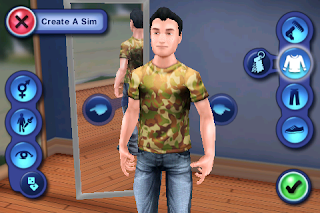
Create a Sim - change the personality, clothing, hair, shoes, all the normal mumbo jumbo usually avalible in the Sims games.

Explore Locations - Walk around your neighborhood (no two neighborhoods will be the same), and explore around town.

Keep 'em satisfied - like usual you will have to keep them fed, hydrated, social, entertained, clean and energized all to keep them happy.

Dream Big - there are 73 Goals to unlock from gardening to cooking, even kicking over garbage cans is a goal!

Long live the sims - like always your sims can reproduce and if you keep your family alive the game will never end!

Some problems with this game I have already found include: Game uses alot of memory and if your listening to music it has a tendency to fource quit, There arn't a ton of options to choose for your sims style there's probably about five options per category, if it closes during the tutorial it will restart from the begining So Stop Your Music!
I've just started playing this game so I'll update what I think of it as I go.

Here's some Pics of it I took:

May 31, 2009

Broken home or power buttons? Here's the solution!

Recently I Came across a program called mQuickDo by mcleaner it's basically a virtual home and power button with alot of options other than that. Some of its features are but arn't limited to, option to "Respring" your device, sleep mode (usually done by taping the power button), lock mode, Home, quick access dock, and I love this one it even gives you the option to completely close out an application and ill explain what I mean by that.
When you use the applications Mail and Safari after you close them using the home button those two apps don't completely close out they run in the background and use up precious virtual memory. mQuickDo gives you the option to open up it's menu (slide your finger across the top or bottom depending where you have the quick access bar.) after opening up the menu if you drag an open app the the left side of the screen it will completely close out the app saving you virtual memory to play your games. If you've used one of the apps like FreeMemory you'll know exactly what im talking about since it's basically the same thing.
Also by opening up the mQuickDo menu you can get a quick access dock what this is is you can open up the mQuickDo menu even when other applications are running. When the menu is open at the bottom there is (up to five icons) on the dock you can open. By opening a new app it will automatically close out the app your in and open up the new one. Another cool feature of the quick access dock is it puts a dock on your lock screen so if you open your lockscreen there will be the dock if you use the dock it will unlock your device and start the app (this will turn off your passcode if you have one).
This app is avalible in Cydia after you add "All Sources" unfortunatly this is not a free app it costs 8 dollars but they do give you a free 3 day trial. this is a great app if your buttons arn't working correctly and your out of warranty. Even if your buttons arn't broken I still Recommend it just because it will extend the life of your device. Eight bucks is a hell of a lot less then 2 -3 hundred
Here's a direct link to the mQuickDo part of mcleaners website. http://mcleaner.com/iphone_w/mquickdo.shtml
While your at it they make good products so check those out also.

May 23, 2009

Ipod Completely and Helplessly Frozen? Not Anymore!

Yesterday my friend gave me his Ipod touch 2G which he thought might be completely frozen so I took a look at it and I found the solution is farly easy but took some time to complete. Also today I was searching the web and I found out someone else was having the same problem so I know it wasn't just a freak accident. Here's the steps to fix your problem.

1. Turn off your Ipod Touch.
2. unplug it from your computer if it was plugged in.
3. Put it into DFU mode. (don't worry if it doesn't get past the boot logo it can still go into DFU mode.) instructions below if you don't know how to do it.
4. if Itunes opens up saying it recognises an ipod in restore mode youve done it right so far.
5. Download the origional Firmware from Itunes or from Here. (this will take about 20 mins.)
6. Restore your Ipod to the origional Firmware.
If all that works your ipod will be fixed and if you want to you can re-jailbreak it.

How to put Ipods into DFU mode.
1. Unplug Ipod touch from computer and turn off.
2. Hold Power and Home buttons while you plug ipod in. (hold for ten seconds.)
3. let go of power and continue holding home until itunes recognises it as ipod in restore mode.

May 15, 2009

Old Programs


OK so last Monday I was tired of my computer running kind of slowly so for that reason mostly and because of an pesky virus I accidentally downloaded I decided that the easiest way to fix my problems was to reformat my computer so until yesterday my computer was down for maintenance while I reformated it and redownloaded the updates and drivers for it. Anyway today as I was deleting the old files from my old setup I found a couple of games I created for my programing class and some other random programs. So I decided what the heck I'll upload them to Megaupload and see what people think. Now keep in mind these arn't games that you'll find on any professionally done CD but they are kinda fun and no installation is necessary to run them they don't take up any room practically since both of them are 600kb put together.


The first game I have uploaded is Roulette its a very easy layout and can give you about ten minutes of entertainment for free (pretty good huh?) Since I did this for a class I didn't put a save feature which would have been cool and I wish I did. You start with 5000 and any money you put in the bank increases with every roll.

http://www.megaupload.com/?d=IZ1CRFI3

The second game I have is Tic-Tac-Toe for this game to have any fun you should use 2 people since there's no "computer" feature. At the bottom of the game it tells you whos turn it is so you never get lost halfway through the game.

http://www.megaupload.com/?d=4KK12OAN

Anyway like I said pretty ameture games but hey 5 mins of entertainment is worth something right? Anyway if you choose to download them tell me what you think good or bad I don't mind feedback is good no matter what kind.

May 11, 2009

Internet Help Caution

Ok here's a point I feel I must bring up. Recently (before I jailbroke
my Ipod) I was looking for safe effective ways to do it and I stumbled
across a site (techlivez.com) which had a way to jailbreak Ipods with
what they say works well while looking at the site I noticed that there
method was very outdated so to make sure it didn't work I read their
comments and found that every comment was from a person who had
trouble. Well naturally I posted a comment saying that I had a way to
do it safely so people wouldn't have problems. To post comments on
their site you had to sign up. Ever since signing up I've recieved
email upon email that were comments from more people having problems.
More and more people were falling victom to the internets outdated
information so by writing this I'm hoping to keep at least one
person from becoming a victom.

Here's some things to look for so you don't become like the others.
1. Make sure your using the best version.

2. If the site lets people comment read the comments if there's alot of
bad comments Ex. (This made my computer crash! Help!) if you see that
and there's no response from the site administrator then steer clear.

3. Make sure you know what your doing! ask around if there's some one
who knows what there doing ask some questions. I'm always avalible for
questions on my youtube site I know alot about computers and I can
possibly help out.

4. If it seems like it's to complicated there probably is an easier way.

5. Don't trust everything you read on the internet you could download
or use something incorrectly and end up messing up your computer.

Always be sure of everything on the list if you have questions ask me
and I'll help I will help you as much as possible to build up trust with
my viewers.