May 18, 2013

iPhone IOS 7 Jailbreak

Hey guys looks like Apple will be releasing their new IOS 7 sometime around September. Unfortunately for you guys who have the 4s device or later (or the 4 who don't want to go tethered) you'll have to wait till the next generation of IOS comes out to jailbreak your new device.

So what's to come of IOS 7? I've heard rumors of a new design which could be anything from an IOS with both Windows phone and Android features or a simpler design in other aspects. I believe apple should take a page or two out of the jailbreaker handbook and make a couple features more accessible as well as make some changes app wise. Here's my thoughts.

1. Hide apps
 It's no secret apple has put a few junk apps on everyone's device (newsstand, passbook, and their maps app) and most people have a junk folder because of it. So why not allow us to hide some apps we don't want to see.

2. Widgets
 Android has made lots of use of widgets on their devices and it's a nice touch to some degree, I'm not saying go overboard but would a weather widget be out of the question on the lockscreen or in the NC center?

3. System prefs shortcuts
 As jailbreakers we like things easier than apple has laid out for us we like our cake to not only to come to us but to be specially designed and come with a fork that feeds us. So why not add a couple quick access system controls in the notification center or one flick over from the volume control in the multi-tasking tray. Just toggles like airplane mode, wi-fi, bluetooth, and the backlight.

4. Active Dock
 This little hack on jailbroken devices is one of my favorite simple, but gives your device that extra flare. Seriously Apple you're already using it on your computers, just bring it to your other products.

Anyway that does it for my IOS 7 info for now tell me what you think, what should Apple do to their new IOS?
Finally, What do you guys want to see in this blog? More tutorials, more reviews. Let me know if there's something you want to see or know more about.

May 17, 2013

Adding music to your music library?

This is a simple task when you have all the music on your computer in iTunes and you want to add it to your library but what if you have a jailbroken device and another app to download songs like Music box or Pandora Downloader, adding music from that library to your Music app is Impossible, right? Wrong...

As you can see I have the song 100 Years on Pandora Downloader I'll show you how to put that in your regular library so you don't have to keep changing libraries.

First, you'll need a client to download songs my two favorite are Pandora Downloader because it gives me unlimited skips, no ads, and the ability to download off Pandora. My second favorite is Music Box it allows me to find specific songs that I haven't been able to find anywhere else.

Second, you'll need the app Bridge if you have the Protube hack on your iPhone you'll probably already have this if not download both of those apps now off Cydia now.

Ok so you have Bridge and your client app now what?

Open Bridge and at the bottom it says "Files" go there you'll now be in your iPhone directory files find the media that you want to add to your Music library if you have used Pandora Downloader the directory you want to find is: /private/var/mobile/Media/Pandora
if you're using Music Box just go: /private/var/mobile/Library
Select the song which for me appears at the top of the list, it will then make you input some information about the song and if you want to import it as a song, ringtone or podcast.

Finally just hit the Import button and you'll get a conformation popup "Finished importing The file was successfully imported!"

Congratulations! Now you don't have to switch between music libraries when you want to hear your music. This method works for videos as well so go nuts! 

Oh Yeah and support your local artists if you like their music!

Movies for free?

Movie must have? Check out Movie Box on Jailbroken Devices seriously best app ever it's like Netflix, and Hulu had a baby and this baby is free. Only one small ad at the bottom of the app but you get movies, TV and some Music Videos all for no cash out of your pocket. I've been watching my favorite TV shows the day after they air (yeah they update it that fast). I almost forgot to mention you can download any movie and TV show right off the app and save it for later watching when you have no internet connection (any flights coming up?) I'm more pleased with this app than I am with Netflix and I've been using that service since 2006. Download it you wont be displeased.
If you like that app check out Music Box same company (obviously) but any songs you want right then? I've found some songs of my favorite Aussie Hip-Hop artists I haven't been anywhere else (I wonder why... Hmmmm) Seriously another app you wont hate me for if you download.

July 10, 2009

Apple apps to not waste your time with.

Hey guys on this post I'll be puting apps I've that are not worth your time so you don't have to waste your time trying out.

cube® Party Roundup (Free) - Usually I love these car promo games (Ex. Audi A4, Volkswagon Polo). But this one was just bad all together. Not only does it take forever to load (for the unlucky few it actually loads for) but the best part of it is being able to customize your car (which was lacking its self) In the App Store it has a 2.5/5 I personally don't even think it's worthy of a one star it was really just that bad. I feel I should be compensated for the time I took to try this game out. So my final rating is 1/10 sorry Nissan you'll just have to do better next time... much better.

July 4, 2009

New iPod firmware 3.0

Hey everyone alot of you that see this will probably have 2.2.1 firmware and are looking to jailbreak it. Well the 3.0 firmware is out and it has a jailbreak of its own now. As soon as I upgrade My iPod and jailbreak it I'll create a video on how to do it and upload it to my youtube channel. Until then you can either continue to jailbreak your iPod touch 2.2.1 or hold off and get the 3.o and jailbreak. I'll also create a video on how to get the upgrade for free.

June 11, 2009

Cracked Apps Getting Deleted During iTunes Sync?

Until now everytime I would try to sync my Cracked .IPA's to iTunes they would just be removed altho I don't know the exact cause of why it's doing it I have figured out some ways to fix it.

1. Go into Installous and under settings switch the "iTunes Sync" switch to off. This will make it so the cracked .IPA's will not be removed from iTunes but they also wont get added to your iTunes library in the case your apps get removed from your jailbroken device you will need to redownload them all. So this is just masking the problem.

2. This will actually fix the problem to a point. If you want to be able to sync your apps to iTunes so you can remove them and readd them later you will need to get on your computer and go to the appulo website: www.appulo.us this is the desktop version of your Installous app. Search the app you want to add to your iTunes library and download it to the file:
C:\Users\Your Username\Music\iTunes\Mobile Applications.
If your Mobile Applications file isn't there open up your iTunes and under the Applications right click any app and select if on vista "Show in Windows Explorer" this might be different on an XP computer. After adding the files to that folder go into iTunes and add the files to the library by going File -> Add Folder to Library then select the Mobile Applications folder. As soon as those files are added to your library you can sync the apps to your device.

As soon as I find out how to sync it from Installous to iTunes I'll post it.

June 4, 2009

Love the SIMS?

Well as of Yesterday June 03 The Sims 3 has been released on the Ipod Touch/Iphone. With great graphics and the traditional sims music. This is one of the better games avalible on Apple devices. It's easy to use and fun to play, If you love The Sims this is definately a great game to get. You can have Three sims per Ipod/Iphone. In the App Store this game will go for $9.99 (but its already been added to installous) it has already won the IGN Editor's Choice and PocketGamer Gold Award with a 9/10.

Here's some of the features.

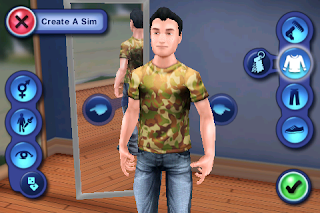
Create a Sim - change the personality, clothing, hair, shoes, all the normal mumbo jumbo usually avalible in the Sims games.

Explore Locations - Walk around your neighborhood (no two neighborhoods will be the same), and explore around town.

Keep 'em satisfied - like usual you will have to keep them fed, hydrated, social, entertained, clean and energized all to keep them happy.

Dream Big - there are 73 Goals to unlock from gardening to cooking, even kicking over garbage cans is a goal!

Long live the sims - like always your sims can reproduce and if you keep your family alive the game will never end!

Some problems with this game I have already found include: Game uses alot of memory and if your listening to music it has a tendency to fource quit, There arn't a ton of options to choose for your sims style there's probably about five options per category, if it closes during the tutorial it will restart from the begining So Stop Your Music!
I've just started playing this game so I'll update what I think of it as I go.

Here's some Pics of it I took: